Icon
Command
Shortcut Key
Toolbar

ALIGNSETTINGS
Settings
Specify how the selection set is aligned or distributed in the Align function.
|
Icon |
Command |
Shortcut Key |
Toolbar |
|
|
ALIGNSETTINGS |
|
Settings |
This function allows you to view and edit the align styles applied during the Align function.
Procedure
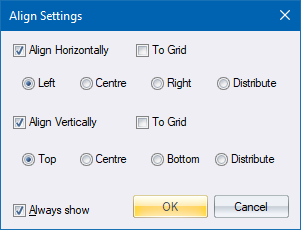
Select the Align Horizontally and/or Align Vertically checkboxes to make the alignment options available.
Select the appropriate radio buttons to select the alignment option (see Align) you require.
If you select the Always show checkbox, the Align Settings display each time you select the Align function.
Click OK to make the options available when you select to align entities; or Cancel to close the Align Settings window.