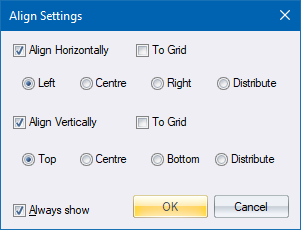
Specify settings to be used when the Align function is run.
These options are displayed when you select the Align Settings menu item, and are automatically displayed the first time the Align function is run in a particular document if Align Settings has not yet been used. Thereafter, the Align function will no longer automatically display these options for this document unless the Always show option has been selected.
|
Option
|
Description |
|
Align Horizontally |
Select this checkbox to enable the horizontal alignment options. |
|
To Grid |
Select this checkbox to align entities horizontally to the nearest grid point, rather than to each other. Note that the Distribute option is not available for this selection. |
|
Left,Centre,Right,Distribute |
Select the type of alignment to be carried out - left sides, centres, right sides, or spaced evenly from left to right. Not available if To Grid is selected. |
|
Align Vertically |
Select this checkbox to enable the vertical alignment options. |
|
To Grid |
Select this checkbox to align entities vertically to the nearest grid point, rather than to each other. Note that the Distribute option is not available for this selection. |
|
Top, Centre, Bottom, Distribute |
Select the type of alignment to be carried out - tops, centres, bottoms, or spaced evenly from top to bottom. Not available if To Grid is selected. |
|
Always Show |
Select this checkbox to always have these options shown when the Align function is run. |