The Sentinel Admin Control Centre (ACC) is installed on every computer where either one of our products is installed, or the network licence manager utility is installed.
The ACC is an HTML application that enables you to manage access to software licences, to control detachable licences, to control sessions and to diagnose problems.
The ACC is accessed by browsing to the address http://localhost:1947 (localhost can be substituted with an FQDN to access the ACC installed on a remote computer).
The import sections for configuration of the ACC are as follows:
|
Option
|
Description |
|
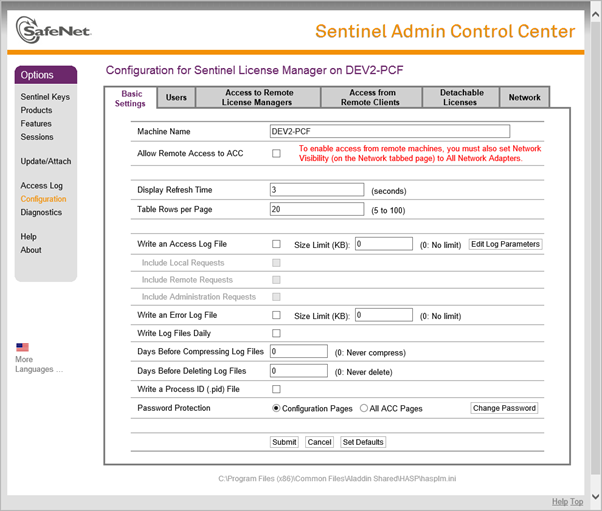
Allow Remote Access to ACC |
Select this checkbox to allow other computers to access the ACC on this computer. Note that Network Visibility must be set to All Network Adapters. |
|
Password Protection |
Select either Configuration Pages or All ACC Pages. For a network licence server, it is recommended to choose All ACC Pages as the ACC could be visible over the Internet. |
|
Change Password |
Click to set the access password for Password Protection. |
The settings on this page are the same as can be made using the Security Settings.
|
Option
|
Description |
|
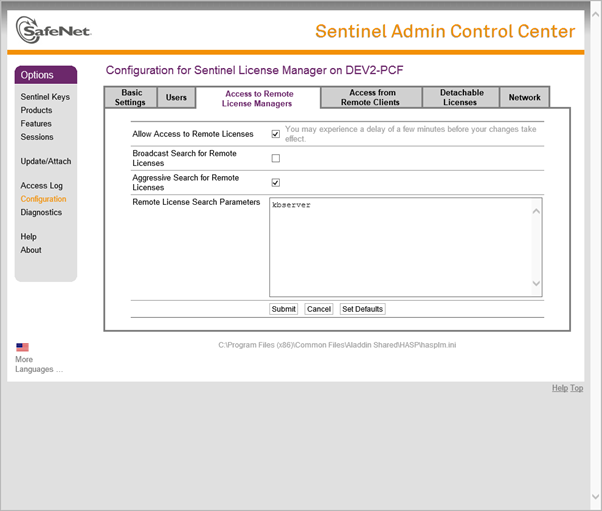
Allow Access to Remote Licences |
Select this checkbox to display the remote Licence Manager licence in the local Licence Manager. Optional for remote Licence Managers within the same local network, required for remote Licence Managers on separate networks (including over the Internet). |
|
Broadcast Search for Remote Licences |
Select this checkbox to allow the local Licence Manager to broadcast a request for available remote Licence Managers within the local network. Ignored for remote Licence Managers located on other networks. |
|
Aggressive Search for Remote Licences |
Select this checkbox to allow the local Licence Manager to do a more detailed search for remote Licence Managers on separate networks including the Internet. This option is generally required in order to get through firewalls installed on routers and the remote computer hosting the network licence. |
|
Remote Licence Search Parameters |
Add the names or IP addresses of all remote Licence Managers from which a network licence can be requested. The licence manager address must be a fully qualified domain name (FQDN) for remote Licence Managers located on separate networks or on the Internet. |
Settings on this page are relevant to network licence servers.
|
Option
|
Description |
|
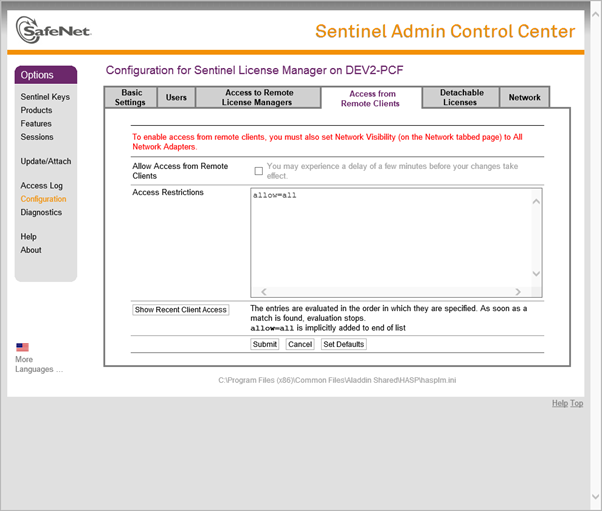
Allow Access from Remote Clients |
Select this checkbox to allow remote computers to access the licence on this computer. Clients not using a network licence should not select this option. |
|
Access Restrictions |
Specify the group of computers that are allowed to access the licence on this computer. This is a list of IP addresses or machine names that are allowed or denied access to the licence on this computer. |
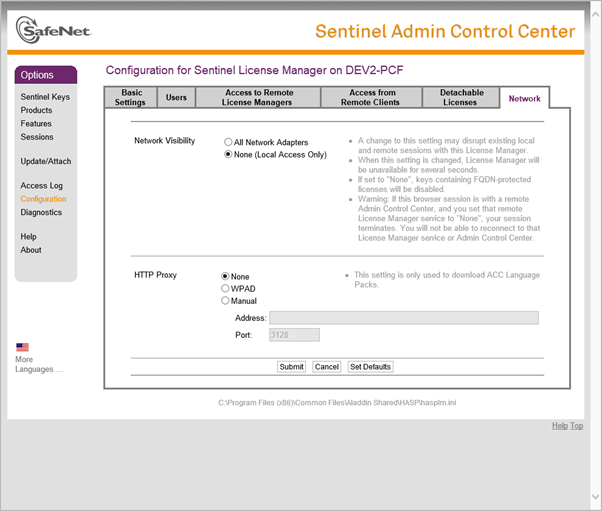
Specify the visibility of the network licence.
|
Option
|
Description |
|
Network Visibility |
Select All Network Adapters for the network licence server, or None for standalone (non-network) licences. |
Settings on this page are only relevant for the network licence computer.
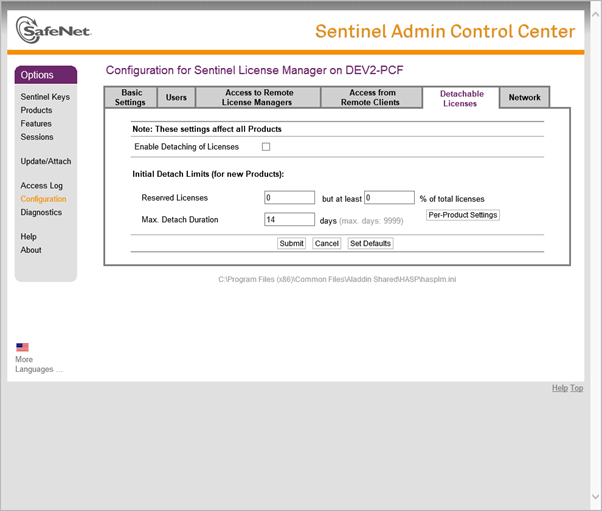
|
Option
|
Description |
|
Enable Detaching of Licences |
Select this checkbox to enable licence detaching. |
|
Max. Detach Duration |
Specify the maximum number of days for which any licence can be detached. The Network Licence Manager application will use this setting to restrict the maximum length of time for which a licence can be detached. |