Icon
Command
Shortcut Key
Toolbar

SECURITYSETTINGS
Misc
Set security system settings.
|
Icon |
Command |
Shortcut Key |
Toolbar |
|
|
SECURITYSETTINGS |
|
Misc |
The Security Settings determines whether your system checks for legacy dongles, or searches for the software security system.
The Security menu options vary depending on the options selected.
|
Menu Option |
Provisional Software Lock |
Legacy Dongles |
Local Software Lock |
Network Software Lock |
|
Authorisation |
|
X |
|
|
|
Request Licence Update |
X |
|
X |
|
|
Request Detached Licence |
X |
|
|
X |
|
Return Detached Licence |
|
|
|
X |
|
Request Licence Rehost |
X |
|
|
|
|
Rehost Current Licence |
|
|
X |
|
|
Apply Licence Update |
X |
|
X |
X |
|
Settings |
X |
X |
X |
X |
Procedure
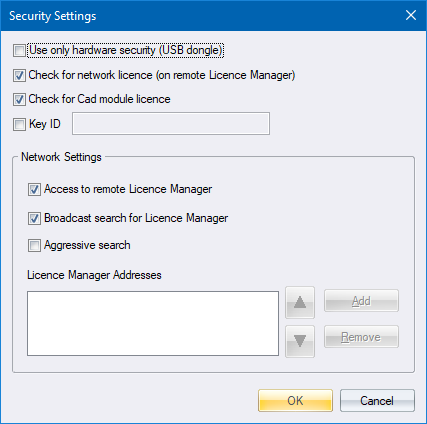
Select the required options and add the IP address of a Licence Manager if you're using a network licence.
Click OK to save the settings and close the dialog.