Icon
Command
Shortcut Key
Toolbar

APPLYSETTINGS
Tools
Apply settings from an existing entity to a selection of entities.
|
Icon |
Command |
Shortcut Key |
Toolbar |
|
|
APPLYSETTINGS |
|
Tools |
This function allows you to take settings from one entity and apply all, or a subset of, the properties to a selection of entities.
 You must select the entities you want to change before running this function.
Procedure
Indicate entity to pick settings from, or right-click for options
Select the entity with the required settings.

Select the appropriate checkboxes to specify the settings you want to apply on the selection.
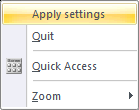
Right-click to display the context menu and select the Apply settings option.