 Mesh entities are always drawn with CONTINUOUS line type.
Draw a polygon mesh by extruding an existing curve entity.
|
Icon |
Command |
Shortcut Key |
Toolbar |
|
|
MESHEXTRUDEDSURF |
|
3D Shapes |
This function allows you to draw a polygon mesh by extruding an existing curve entity in an indicated direction and length.
Mesh entities are always drawn with CONTINUOUS line type.
Procedure
Indicate entity to use as the profile
Click on any entity in the drawing.
Indicate first point of axis of extrusion
Indicate any point in the drawing.
Indicate second point of axis of extrusion
Indicate any point in the drawing.
Usually you would use POINT snap mode to snap to the first and second points that define the extrusion axis in 3D.
In the procedure above, when you are asked to indicate the points for the extrusion axis:
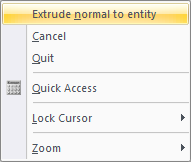

Type in the length (in drawing units) and press {Enter].