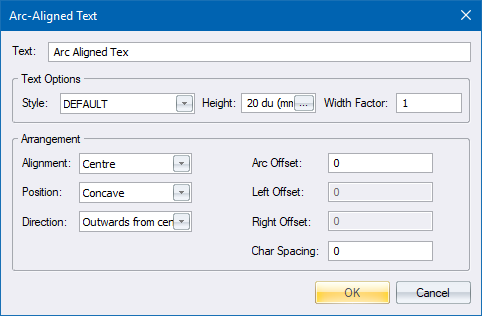
Specify settings for Arc Aligned text.
|
Option
|
Description |
|
Text |
Enter the text which is to be written on the arc. |
|
Text Options |
|
|
Style |
Select the text style to be used. |
|
Height |
Enter the height of the text (enter 0 to use the style height). |
|
Width factor |
Enter the horizontal scaling factor for the text. |
|
Arrangement |
|
|
Alignment |
Select the alignment of the text relative to the arc. |
|
Position |
Select whether to place the text on the inside or outside of the arc. |
|
Direction |
Select the direction towards the top of the text should face. |
|
Arc Offset |
Enter the distance between the arc and the text, in drawing units. |
|
Left Offset |
Enter the distance between the start of the arc and the start of the text, in drawing units. |
|
Right Offset |
Enter the distance between the end of the arc and the end of the text, in drawing units. |
|
Char Spacing |
Specify the spacing between characters. Only available if the Alignment option is not specified as Fit. |